Google Business Profile for Small Business: What Actually Ranks
For most local businesses the Google listing gets more visits than the website. It is also the thing most owners set up once and never touch again. Here is what to fill in, what to keep doing, and what to leave alone.
Google ranks local listings on three things it names openly: relevance, distance and prominence. You control the first and the third. Distance is where your door is.
Most of the ranking gain comes from a handful of fields done properly: primary category, services, opening hours that are actually true, and a description written for a person.
Reviews are the compounding asset. Not the star average, the steady flow of recent ones with real replies underneath.
A profile is not a project, it is a habit. Ten minutes a week beats a perfect setup you abandon in March.
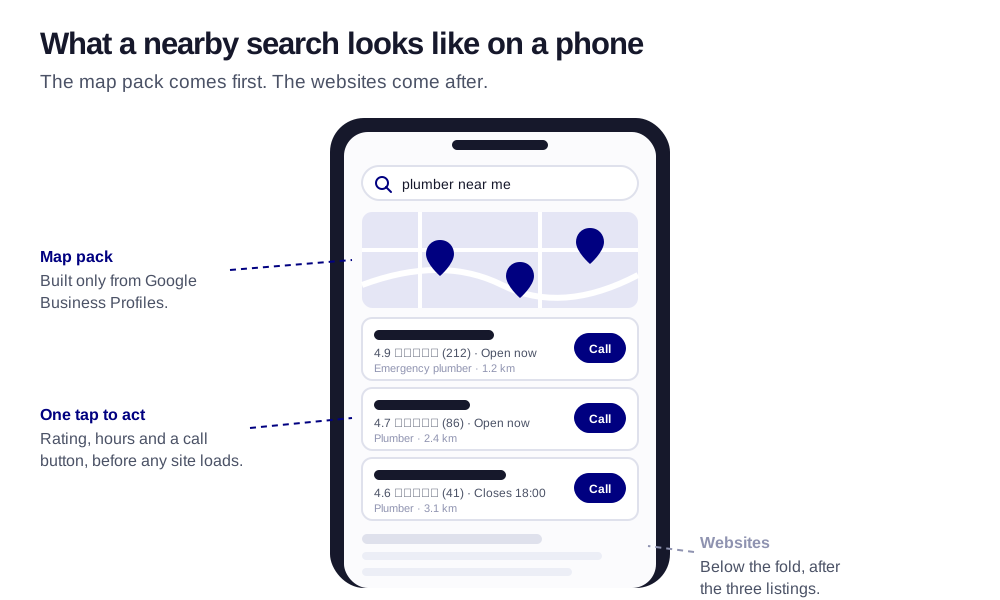
The listing is the shopfront most customers see first. The pins, the stars and the replies are what they judge it on.The map pack sits above the websites. For a nearby search on a phone, the three listings in it get the tap before anything else loads.
Search for a plumber, a dentist or a place for lunch on your phone and the first thing you see is not a website. It is a map with three businesses pinned to it, each with a star rating, opening hours and a call button. That block is built entirely from Google Business Profiles, the free listing Google gives every business. For a small business, the profile is very often the first, and sometimes the only, place a new customer meets you.
Which is why it is strange how little attention it gets. The website was paid for, so it gets looked at. The profile was free, so it was set up in an afternoon three years ago and has not been opened since. This guide is the correction: what to fill in, what to keep doing every week, and what to do about reviews, in that order.
98%
of consumers say they read online reviews for local businesses at least occasionally. The profile is where most of those reviews live, and where the reading happens.
Source: BrightLocal, Local Consumer Review Survey 2023
How Google decides who appears in the map
Google is unusually open about this one. Its own help documentation for local ranking lists three factors: relevance (how well the listing matches what was searched), distance (how far the business is from the searcher, or from the place they named), and prominence (how well known the business is, measured through reviews, links, articles and how it ranks in ordinary web search).
Distance you cannot change without moving. Relevance and prominence you can. Relevance is mostly a question of filling in the profile completely and accurately. Prominence is mostly a question of reviews and of having a website and a wider presence that Google can connect to the listing. Almost everything below is one of those two levers.
The one idea to keep
Google is trying to answer a question: "which of these businesses is really the best match for this person, right now?" Every field you fill in and every review you earn is evidence. Thin profiles do not lose because Google dislikes them. They lose because there is nothing to go on.
The fields that do the ranking work
A profile has dozens of fields, and they are not equal. These are the ones worth getting right first, in roughly the order they matter.
1
Primary category
The single most important field. It tells Google which searches you belong in at all. Be specific and honest: "Italian restaurant", not "Restaurant"; "Emergency plumber" only if you actually answer at 3 a.m. Add secondary categories for real other things you do, and resist adding ones you do not.
2
Business name, exactly as it is on the sign
Not "Marta's Salon, Best Hair Colour in Valencia". Google's guidelines forbid stuffing keywords into the name, and listings that do it get reported by competitors and suspended. The name is the name. The keywords go in the fields built for them.
3
Services and products, one per line
List each thing you do as its own service with a short description and, where you can, a price or a from-price. This is where relevance gets built: someone searching for "boiler repair" matches a listing that says boiler repair, not one that says "all plumbing work".
4
Opening hours that are true
Including holidays, including the Tuesday you close early. A customer who drives to a closed door because the profile said open leaves a one-star review that outlives the mistake by years. Set special hours ahead of every public holiday; it takes a minute.
5
A description written for a human
You get 750 characters. Use the first two sentences to say what you do, for whom, and where, in the words a customer would use. Then what makes you the sensible choice. No lists of neighbourhoods, no capital letters, no "best".
6
Photos that look like today
The front of the building (so people recognise it), the inside, the team, the work. Recent, well lit, taken on a phone is fine. Replace the ones from the opening week. Photos are one of the first things a searcher looks at and one of the first things that goes stale.
7
Phone, website and booking link
The phone number that is actually answered. The website that actually loads on a phone. If you take bookings, a link straight to the booking page, not the homepage. Every step you remove between the listing and the action is a customer you do not lose on the way.
8
Attributes
Wheelchair access, outdoor seating, women-owned, appointment required, accepts cards. Small fields, but they answer the filters people apply and the questions AI assistants get asked. Tick the true ones.
Three kinds of field: the ones you do once, the ones you keep true, and the ones that only work if they keep flowing.
Reviews: the part that compounds
If you do nothing else from this article, build a way of asking for reviews that does not depend on remembering. Reviews feed prominence directly. They are also what a person actually reads before choosing, and increasingly what an AI assistant summarises when someone asks it to recommend a place.
Three things matter more than the star average. Recency: a listing whose last review is from 2024 looks closed. Volume over time: a steady trickle beats a burst, and a burst of twenty in one week looks bought. Replies: an owner who answers, including the bad ones, calmly and specifically, is visibly a business that is paying attention.
1
Get your review link
Inside the profile dashboard there is a short link that opens the review box directly. Save it. Put it on the receipt, on a small card at the till, in the confirmation email, and as a QR code where people wait.
2
Ask at the moment of satisfaction
Not at the invoice. When the job is finished and the customer says "that's great, thank you", that is the moment. A day later, at most two, is still fine. A month later is a favour they have forgotten they owe.
3
Automate the ask
Any booking or invoicing tool can send a short message a day after the job with the link in it. Set it up once and stop relying on remembering. This is the single highest-value automation most local businesses can build; we explain how to pick it in which jobs to automate first.
4
Reply to every review within a few days
Two lines for a good one, with something specific from the visit so it does not read as a template. For a bad one: thank them, state the one fact that matters, offer to fix it offline. Never argue, never mention their name in a way that identifies them if they did not, and never reply angry on the same day.
5
Never buy, trade or fake them
Google removes reviews it thinks are fake and can suspend the listing that received them. The people who buy reviews always think they are the ones who will not get caught. Slow and real wins, and it also happens to be the only version that produces customers.
The ten-minute weekly routine
A profile is a living record, and Google notices when it is alive. The whole routine fits in a calendar reminder on Monday morning.
Reply to new reviews. Usually one or two. If there are none, it is a reminder to ask.
Answer the questions. The profile has a public Q&A section that anyone can answer, including strangers with wrong information. Answer them yourself, and seed the five questions you get asked every day.
Post one update. A photo of this week's work, a seasonal offer, a change of hours, a new service. Posts expire, so a steady stream matters more than any single one.
Check the hours. Especially in the run-up to a holiday. Google also sometimes edits listings from third-party data; a monthly glance catches an hour change you never made.
Glance at the numbers. The profile shows how people found you, what they searched, and how many called or asked for directions. Watching that for five minutes a week teaches you more about your customers than most reports.
The website still matters, for a different reason
It is tempting to conclude that if the listing gets the tap, the website is optional. It is the opposite. Google connects the listing to the site, and the site is a large part of what it means by prominence: does this business exist beyond the listing, does it say the same things, do others link to it. A profile pointing at a slow page from 2019, or at nothing, is a profile with a weak foundation.
The practical rule is consistency. Same name, same address, same phone number, same categories of service, on the listing, on the site and everywhere else you appear. Then make the site do the one job the listing cannot: explain, in enough depth, why someone should choose you, with a way to book or call on every page. That is the job a small business website is for, and the reason the two together outperform either alone. If you want to understand where all of this is heading as AI assistants start answering the search directly, read getting found when AI answers first.
Mistakes that get listings suspended or buried
Keywords in the business name. The most common reason a small business listing is suspended. It works for a month and then it is gone, along with the reviews.
A service-area business showing a home address. If you go to customers and they do not come to you, hide the address and set a service area. Showing a house on the map is against the guidelines and looks odd to customers.
Duplicate listings. An old one from a previous owner, one made by an employee, one from a directory. They split reviews and confuse Google. Claim and merge or remove them.
Letting strangers answer your Q&A. The section is public. If you leave it empty, someone else fills it, sometimes wrongly.
Treating a suspension as final. It is not. There is a reinstatement form. Fix the violation first, then appeal, plainly and honestly. Most legitimate businesses get back.
Not sure what your listing is missing?
Send us the name of your business and we will look at the profile and the site together and tell you the three things that would move it most. No report, no invoice, a short honest email.
Yes, completely. Creating, verifying and managing the profile costs nothing, and Google does not sell better placement in the map results. Anyone offering to "register you with Google" for a fee is reselling a free form, and the ones who call about it unprompted are usually not worth talking to.
How long does it take to see results after optimising the profile?
Corrections to categories, hours and services usually show within days. Movement in the map ranking is slower, because prominence is built from reviews and signals that accumulate over weeks and months. Give a properly completed profile eight to twelve weeks of the weekly routine before judging it.
Do I need a website if I have a Google Business Profile?
You can be found without one, but you rank better and convert better with one. Google uses the site as part of prominence, and customers use it to decide once the listing has caught their eye. A simple, fast, mobile-first site that matches the listing is enough; you can see what that costs on our pricing page.
Can I remove a bad review from my Google Business Profile?
Only if it breaks Google's policies, for example spam, a review of the wrong business, or content that is off-topic or abusive. You can flag it from the dashboard and Google decides. An honest negative review from a real customer stays; the best response is a calm, specific public reply, which future customers read more carefully than the review itself.
K
The Kodable team
A small studio using AI to help local businesses get found, get booked, and win back their week.
Google increasingly writes the answer at the top of the page, and fewer people click through. Here is what actually changed for a local business, and the honest playbook for getting found when AI answers first.
Most small businesses run on a second, unpaid job: the copying, chasing and re-typing that fills the gaps between real work. Here is which parts of it to hand over first, and how to choose without buying six subscriptions you do not need.
Every week without this is a booking someone else is getting.
When a customer searches nearby and books the competitor with a faster site and instant replies, it isn't because they were better. It's because they were easier to find and faster to answer. That's fixable, and it starts with a 15-minute chat that costs nothing.